
A student edits a few Instagram reels using CapCut, adds automatic captions, applies a trending transition, and gets a few thousand views. Naturally, the next thought is: I know video editing. Can I start working for international clients?
Then an overseas client sends a different kind of assignment.
There are 40 minutes of raw footage, separate audio recordings, brand guidelines, motion graphics, and a requirement to deliver the final video along with editable Adobe Premiere Pro project files.
Suddenly, knowing how to create an attractive reel is only part of the job.
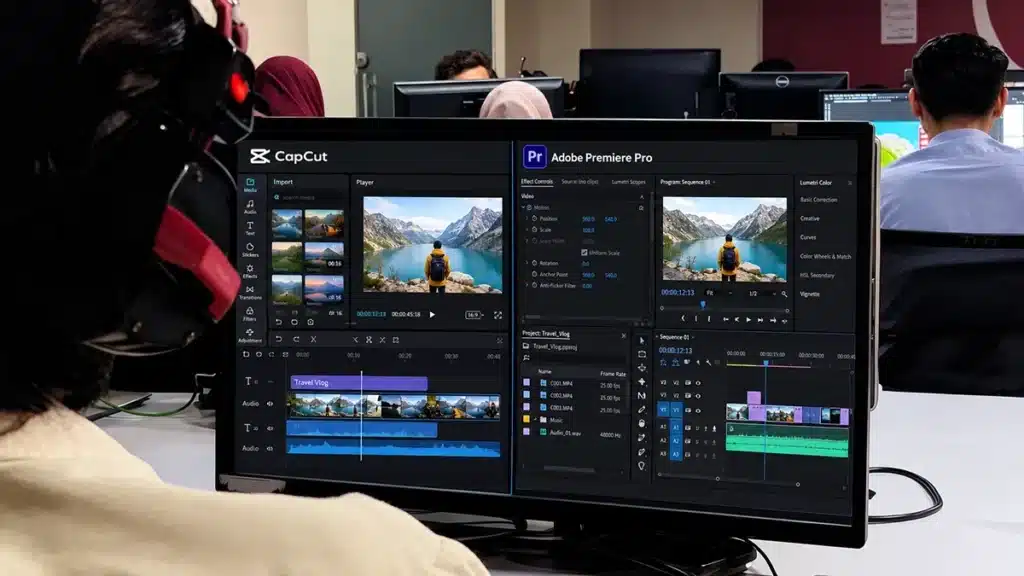
This is where the CapCut vs Premiere Pro comparison becomes important.
Short answer: CapCut is an excellent choice for quick social media videos, automatic captions, templates, and convenient editing. Adobe Premiere Pro is generally a better investment for editors pursuing complex commercial projects, professional post-production, international agency work, and clients who require Adobe project files.
CapCut can produce professional-looking videos. However, knowing Premiere Pro allows you to take on additional types of assignments that depend on an established Adobe editing workflow.
At SkillsVerse in Rawalpindi, we focus on Adobe Premiere Pro, After Effects, and Photoshop rather than CapCut because our training is designed to develop professional production skills that can be applied to local businesses, production companies, and international client projects.
Let’s look at what makes these tools different and which one makes more sense for your career.
CapCut vs Premiere Pro: Understanding the Main Difference
Before deciding which software to learn, understand what each application is primarily designed to do.
CapCut is a video editing application available on mobile, desktop, and the web. It is popular for social media production because of its accessible editing tools, automatic captions, templates, effects, and AI-assisted features.
It can be particularly convenient for Instagram Reels, TikTok videos, YouTube Shorts, and content that needs a quick turnaround.
Adobe Premiere Pro is a professional nonlinear video editing application developed for more extensive post-production workflows. Editors can use it for short videos, advertisements, documentaries, interviews, wedding films, podcasts, corporate videos, and other commercial productions.
Premiere Pro also integrates with applications such as After Effects, Photoshop, and Adobe Media Encoder.
The difference is not simply video quality. Both applications can export high-quality videos.
The more important difference is how well the software fits the complete production process, including editing, media management, collaboration, revisions, motion graphics, and delivery.
CapCut vs Premiere Pro: Feature Comparison
| Feature | CapCut | Adobe Premiere Pro |
|---|---|---|
| Main strength | Fast social media editing | Flexible professional post-production |
| Platforms | Mobile, desktop and web | Professional desktop workflow |
| Beginner accessibility | Easier to start | More tools and a steeper learning curve |
| Short-form videos | Excellent for quick production | Excellent, with greater workflow control |
| Long-form editing | Supported, especially on desktop | Well suited to complex long-form work |
| Multicamera editing | Available in supported desktop workflows | Established multicamera editing and syncing |
| Audio editing | Built-in editing and enhancement tools | Detailed timeline, mixing and audio workflows |
| Colour correction | Filters, colour controls and grading tools | Lumetri Color, scopes and detailed grading |
| Motion graphics | Built-in animation and effects | Integration with Adobe After Effects |
| Project handover | CapCut project and team-sharing options | Premiere project files and professional interchange options |
| Team collaboration | CapCut team and cloud features | Team Projects, Productions and Frame.io workflows |
| Pricing | Free and paid features | Paid Adobe subscription |
| Best career fit | Social media creators and fast-turnaround work | Editors targeting broader professional and Adobe-based client workflows |
Neither application automatically makes someone a better editor.
A skilled CapCut editor can produce a better advertisement than a beginner working in Premiere Pro.
But software compatibility matters when a company or agency has already established how its editing team works.
Why Adobe Premiere Pro Is Important for International Video Editing Careers
This is the part Pakistani students should consider carefully.
When applying for international editing work, your competition is not limited to people in Rawalpindi, Islamabad, or Lahore.
You may be competing with freelancers from India, the Philippines, Europe, and other countries.
Clients are looking for people who can produce good work and fit into their production process.
Sometimes that process specifically requires Adobe Premiere Pro.
1. International Agencies May Require Adobe Project Files
Imagine an agency based in the United States hires an editor in Pakistan to produce three advertisements.
The editor completes the videos and delivers three MP4 files.
Everything looks good.
A week later, the agency needs to change the product price, replace an animated logo, and adjust the advertising message.
If the agency’s in-house team uses Premiere Pro, it may want the original editable Premiere project rather than having to rebuild the video.
In that case, delivering only an MP4 is not enough.
This is not just a hypothetical software preference.
A September 2026 freelance advertisement for fitness and wellness video ads specifically required the editor to use Adobe Premiere Pro and deliver editable project files.
The requested videos were short social media advertisements.
That is an important distinction: Premiere Pro is not only useful for long videos. It can also be a project requirement for a 15-second advertisement.
CapCut has editable projects and collaboration features, but a CapCut project is not automatically interchangeable with an Adobe Premiere Pro project.
If a client specifically requires an Adobe workflow, knowing Premiere Pro can make you eligible for work that would otherwise be difficult to deliver in the required format.
2. Adobe Premiere Pro Supports Established Collaborative Workflows
International video production often involves more than one person.
An editor in Pakistan might prepare the initial cut, a creative director in another country might review it, and another editor might complete the final version.
Everyone needs to understand which footage, graphics, sequences, and project version they are working on.
Premiere provides collaboration tools such as Team Projects and Productions for different team setups.
Its integration with Frame.io also supports shared reviews and time-specific client feedback.
For example, instead of receiving a vague message saying, “The middle section feels slow,” an editor can receive feedback attached to a particular moment in the video.
The client can identify the exact scene that needs attention.
CapCut also supports cloud and team-based collaboration. The advantage of Premiere is its integration with a broader professional post-production environment, especially when the agency already uses Adobe software.
You can explore these capabilities in Adobe’s official collaboration documentation.
3. International Clients Often Need More Than One Video Format
A marketing agency may need one video in several versions:
- A 16:9 landscape version for YouTube
- A 9:16 vertical version for Instagram Reels
- A square or other social media variation
- A shorter advertisement with a different opening
- A version with alternative subtitles or messaging
- An updated version for a later campaign
CapCut can create different video sizes and variations.
Premiere Pro is particularly useful when those deliverables form part of a larger project containing multiple sequences, detailed graphic assets, and versions that need consistent editing decisions.
Instead of treating every deliverable as a completely separate job, an editor can organise the project around a repeatable workflow.
That becomes useful when an international client expects ongoing content production rather than one finished video.
4. Adobe Premiere Pro Works With After Effects and Photoshop
This is one of the strongest reasons we focus on Adobe applications at SkillsVerse.
Consider a client asking for a product advertisement.
The video may require an animated logo, moving product labels, a professional thumbnail, and several promotional graphics.
You could use three applications within the same production:
Adobe Premiere Pro: Edit footage, create the story, balance audio, correct colours, and assemble the advertisement.
Adobe After Effects: Produce animated logos, tracked text, motion graphics, and visual effects.
Adobe Photoshop: Prepare product images, branded graphics, image compositions, and thumbnails.
Premiere Pro and After Effects also support Dynamic Link, which allows compatible compositions to be used across the applications without manually exporting each intermediate animation.
This is valuable when the client changes the animation or requests another version.
Adobe explains the workflow in its Dynamic Link documentation.
An editor who understands how these applications work together can offer a wider range of post-production services.
5. Professional Project Handover Matters
Many beginners only think about the final exported video.
But some professional assignments also require the underlying editing materials.
A client may ask for:
- The Adobe Premiere project file (
.prproj) - An After Effects project (
.aep) - Linked graphics and media assets
- Fonts or references to properly licensed resources
- Organised source footage
- Final video exports in specified formats
- A project that another editor can reopen without broken media links
These files should be provided when source-file handover is part of the agreement.
Premiere also supports professional interchange formats such as AAF, XML, and EDL for appropriate workflows, although not every project element will transfer perfectly between applications.
Learning how to prepare these deliverables makes you more useful in collaborative production.
The international advantage is not that every overseas client uses Premiere Pro. It is that learning Premiere Pro prepares you for a substantial category of work where Adobe compatibility is specifically requested.
Other professional editors and studios use DaVinci Resolve, Final Cut Pro, Avid, and other systems. The software requested by the client ultimately matters.
Where CapCut Is Actually Better
A fair comparison should explain where CapCut makes sense.
Suppose a clothing store in Rawalpindi needs a 20-second promotional reel.
The footage is already recorded on a phone. The owner wants a quick edit, readable captions, music, and a few transitions.
CapCut can be an efficient choice.
It provides accessible controls and features that make routine social media editing convenient.
Situations Where CapCut Works Well
Instagram Reels and TikTok videos
Short videos involving subtitles, trending effects, simple transitions, and quick publishing are a natural fit.
YouTube Shorts
Creators producing frequent short videos may prefer CapCut’s templates, captioning tools, and streamlined interface.
Personal content creation
Someone documenting travel, recording educational clips, or building a personal social media page may not need a complete Adobe production workflow.
Quick promotional content
Some businesses need content published the same day. CapCut can reduce the time spent setting up a simple edit.
CapCut Desktop also supports more advanced features than many people associate with the mobile application, including keyframes, colour controls, multiple video tracks, and multicamera editing in supported workflows.
So it would be inaccurate to say CapCut cannot create a professional video.
What matters is the type of work you want to pursue.
If your goal is limited to quick social media production, CapCut may be sufficient.
If your goal is to offer broader editing services, work with agencies, and handle projects designed around Adobe software, Premiere Pro becomes more valuable.
Where Premiere Pro Offers a Stronger Professional Workflow
There are several situations where Premiere Pro provides practical advantages.
Long-Form YouTube Videos and Podcasts
A 30-minute interview may involve several hours of original footage, multiple speakers, background recordings, music, B-roll, titles, and corrections.
CapCut Desktop can edit long videos, but Premiere Pro offers a highly developed environment for organising and refining more complicated projects.
Useful Premiere skills include:
- Creating bins for different footage types
- Using markers to identify important moments
- Synchronising camera and audio recordings
- Creating multicamera sequences
- Using keyboard shortcuts to speed up trimming
- Managing separate dialogue, music, and sound-effect tracks
- Preparing organised projects for repeated revisions
Length alone does not determine which software is necessary.
The number of assets, complexity of the edit, and client’s production requirements matter more.
Professional Colour Correction
Imagine editing a wedding filmed with three different cameras.
One camera records warmer colours, another produces a cooler image, and the third has inconsistent exposure.
You need the footage to feel like one continuous production.
Premiere Pro’s Lumetri Color tools and video scopes help editors evaluate exposure, colour balance, saturation, and shot consistency.
CapCut offers colour correction and grading features too.
The advantage of Premiere becomes more significant when the work requires detailed analysis, repeatable corrections, and matching across complex footage.
Advanced Audio Editing
A video may look excellent but still feel unprofessional because of poor sound.
Suppose the client records an interview in a room with an air conditioner running.
You may need to reduce low-frequency rumble, control dialogue levels, balance music, improve speech clarity, and ensure the finished video is comfortable to listen to.
Premiere Pro provides detailed audio-track editing, processing, keyframing, and mixing controls.
The goal is not to make every voice sound heavily processed.
It is to make the conversation easy to understand.
Complex Revisions and Version Control
Client revisions are a normal part of video production.
A typical revision request might say:
“Move the product demonstration earlier, shorten the introduction, replace the background music, and use our updated logo.”
These changes are possible in multiple editing applications.
The difference is how efficiently you can manage them within a structured production containing linked graphics, organised media, and multiple deliverables.
Premiere Pro is well suited to that kind of workflow.
A good editor also saves versions carefully, keeps media organised, and agrees on the number of revisions before starting the work.
Professionalism comes from the workflow and the editor’s judgement, not from the software name alone.
CapCut vs Premiere Pro for Freelancing in Pakistan
So which software gives Pakistani freelancers better career opportunities?
The answer depends on the services you intend to offer.
If You Want to Edit Social Media Reels
CapCut is a valid starting point.
You can learn the basics of cutting, captions, music selection, and visual pacing and begin building a portfolio.
This can be useful when working with local clothing brands, cafés, small businesses, and independent creators.
However, do not assume that every social media editing client accepts any editing software.
Some agencies specifically require their editors to use Premiere Pro, even when producing short-form content.
If You Want to Edit YouTube Videos for International Clients
Premiere Pro is a strong choice.
Many YouTube editing assignments involve long footage, frequent revisions, separate audio, B-roll, motion graphics, and ongoing production schedules.
Learning Premiere Pro together with After Effects can help you meet briefs that specifically request those applications.
You should also learn video storytelling, audience retention, captioning, thumbnail design, and communication.
Simply knowing the software is not enough.
If You Want to Work With Marketing Agencies
Adobe Premiere Pro and After Effects are especially useful skills to develop.
Agencies may handle brand advertisements, commercial productions, promotional videos, corporate content, and recurring social media campaigns.
Some require native project files so their creative teams can make additional changes.
Photoshop is a useful complementary skill because many video campaigns also involve branded images and graphic assets.
If You Want to Become a Wedding or Event Video Editor
Premiere Pro can support complex wedding and event workflows involving multiple cameras, separate audio sources, long recordings, and short highlight videos.
The most important skills are storytelling, music selection, multicamera editing, audio synchronisation, and colour matching.
Premiere is not the only professional application suitable for this work, but it is a practical option for building these skills.
If You Want to Work for an International Production Company
Learn the software required by the particular employer.
Adobe Premiere Pro is a worthwhile application to know, especially when paired with After Effects and professional file-management practices.
But international production companies do not all use identical editing systems.
Your portfolio, technical ability, communication, and ability to collaborate remain important hiring factors.
Why SkillsVerse Teaches Adobe Premiere Pro Instead of CapCut
At SkillsVerse, our decision to focus on Adobe software is deliberate.
We want students to learn more than how to create quick videos using templates.
Our video editing training focuses on the workflow behind professional content production.
That includes organising footage, making editing decisions, working with audio and colour, preparing graphics, and delivering completed projects.
Adobe Premiere Pro Is Our Main Editing Software
Students develop editing fundamentals using Adobe Premiere Pro.
The focus includes managing footage, building sequences, trimming accurately, working with multiple tracks, improving audio, correcting colour, and exporting videos.
These are practical skills that can be used across interviews, advertisements, promotional videos, and other editing projects.
After Effects Expands Motion Graphics Skills
Professional video editing increasingly involves animated text, branded graphics, visual effects, and product animations.
Adobe After Effects helps students understand how those elements can be created and incorporated into an edit.
Learning animation also gives students a broader skill set than basic cutting alone.
Photoshop Supports Video Production
Photoshop is useful for preparing images, YouTube thumbnails, product graphics, and other visual materials needed in editing projects.
Students can better understand how design and video editing work together.
We Focus on Transferable Professional Skills
The most useful editing skills are not tied to one template or effect.
They include pacing, storytelling, sound judgement, organisation, colour consistency, communication, and professional delivery.
Learning these skills within Adobe Premiere Pro prepares students to develop more advanced workflows as their experience grows.
Our objective is not to teach students the most software applications. It is to help them become confident with a professional Adobe-based workflow.
A Practical Example: Editing One Client Advertisement With Adobe Software
Let’s take a realistic example.
A company sends you footage of a new product and wants a 45-second advertisement.
The video needs a strong opening, product details, background music, an animated logo, and versions for Instagram and YouTube.
Here is how you could complete the assignment.
Step 1: Organise the Footage in Premiere Pro
Create separate folders for product footage, voice recordings, music, brand assets, and exports.
Import the footage and identify the strongest shots.
Build a rough edit that communicates the product’s value before adding effects.
Step 2: Improve Pacing and Audio
Remove weak or repetitive shots.
Select music that supports the advertisement and balance it with any voiceover.
Make sure the message is understandable without unnecessary transitions.
Step 3: Create Motion Graphics in After Effects
Animate the logo, create a product-feature callout, or add a simple closing graphic.
Use motion graphics to communicate useful information rather than decorating every shot.
Step 4: Prepare Visual Assets in Photoshop
Create or adjust branded graphic elements.
Prepare any product images that need retouching or background changes.
Step 5: Complete the Edit in Premiere Pro
Combine the footage, audio, motion graphics, and design assets.
Correct colours, review titles, and check the finished sequence.
Create the agreed aspect-ratio versions.
Step 6: Deliver the Final Files
Export the videos according to the client’s specifications.
If editable files are part of the contract, collect the required project files and media so another editor can reopen the work.
This is an example of a complete Adobe production workflow.
The difference is that you are not simply exporting one finished reel. You are organising a project that can be reviewed, modified, and reused according to the client’s requirements.
Is Adobe Premiere Pro Difficult for Beginners?
Premiere Pro has more controls and workflows to learn than CapCut’s beginner-oriented interface.
But you do not need to master everything at once.
A good learning sequence looks like this:
Week 1: Editing fundamentals
Learn how to import footage, create sequences, navigate the timeline, cut clips, and organise a project.
Complete a short video without advanced effects.
Week 2: Audio, colour, and storytelling
Practise removing dead air, using B-roll, adjusting music, improving dialogue, correcting exposure, and creating readable titles.
Complete a simple interview or promotional video.
Week 3: After Effects and Photoshop
Learn basic motion graphics, simple logo animation, and graphic-asset preparation.
Practise bringing those assets into your Premiere project.
Week 4: Complete a Client-Style Project
Work from a clear brief, complete the edit, export the required formats, and handle simulated client feedback.
This is a suggested practice roadmap, not a promise that every learner will become professionally experienced in four weeks.
Editing judgement develops through repetition and feedback.
Read our complete guide on how to become a video editor in Pakistan for more advice on portfolios and finding clients.
Can You Run Premiere Pro on a Budget Laptop in Pakistan?
One reason beginners choose CapCut is that it is accessible on phones and many computers.
Premiere Pro requires a compatible desktop or laptop system.
According to Adobe’s current Premiere technical requirements, the Windows version generally requires at least 8 GB of RAM on supported standard PCs, with 16 GB recommended for HD work and 32 GB or more recommended for 4K editing.
You also need a supported operating system, processor, graphics hardware, and sufficient storage.
What if Your Computer Has 8 GB of RAM?
You may be able to work with lighter video projects and proxies, provided your computer meets the other requirements.
Proxy editing creates lower-resolution copies of large video files so they are easier to handle while editing.
In Premiere Pro, eligible footage can be selected in the Project panel and processed using Proxy > Create Proxies.
Proxies can improve performance, but they cannot fix every hardware limitation.
Before buying a laptop, check the Adobe version you plan to install and the type of editing you want to do.
Our laptop guide for video editing in Pakistan explains what to consider.
CapCut vs Premiere Pro: Frequently Asked Questions
Is Adobe Premiere Pro better than CapCut?
Adobe Premiere Pro is generally better suited to complex professional editing, structured post-production, Adobe application integration, and workflows requiring native Premiere project files. CapCut is often more convenient for quick social media edits, automatic captions, and template-based content. The better choice depends on the project’s requirements.
Can CapCut edit professional videos?
Yes. CapCut can produce professional-quality short videos and can handle more advanced projects through its desktop application. However, it may not be the right choice when a client specifically requires Adobe Premiere project files, After Effects integration, or another particular production workflow.
Why do international clients ask for Adobe Premiere Pro?
Some international clients and agencies already use Adobe Premiere Pro within their teams. They may require editable project files, compatible graphic assets, organised timelines, or collaboration with other Adobe users. Using the same software can simplify handover, revisions, and ongoing content production.
Is Premiere Pro necessary for international freelancing?
Not for every international editing job. Many freelancers deliver successful projects using CapCut, DaVinci Resolve, Final Cut Pro, and other software. However, if a client specifically requests a Premiere Pro project, using the required software can be a condition of the assignment.
Should beginners learn CapCut or Premiere Pro first?
If your only goal is quick personal reels, CapCut is an accessible option. If you want to pursue Adobe-based professional editing, agency projects, YouTube editing, or a broader post-production career, beginning with Premiere Pro is a reasonable long-term investment.
Is Premiere Pro good for Instagram Reels and YouTube Shorts?
Yes. Premiere Pro can create vertical videos, captions, graphics, music-based edits, and platform-specific exports. It is particularly useful when social media videos are part of a larger branded campaign or when the client requires Premiere project files.
Do professional video editors use CapCut?
Some professional editors use CapCut for suitable social media assignments. Others use Premiere Pro, DaVinci Resolve, Final Cut Pro, or Avid. Professional status comes from the quality of the work, the ability to meet requirements, and reliable delivery—not simply the editing application.
Does Premiere Pro work with After Effects?
Yes. Adobe Premiere Pro and After Effects can exchange compatible compositions through Dynamic Link, allowing editors to incorporate motion graphics into Premiere projects without repeatedly exporting intermediate renders.
Is Adobe Premiere Pro free?
Premiere Pro is paid software available through Adobe subscriptions, with trial availability and plan terms depending on Adobe’s current offers. CapCut offers free editing features alongside paid options. Always check the official providers for current pricing and licensing.
Where can I learn Adobe Premiere Pro in Rawalpindi?
SkillsVerse offers in-person video editing training at Satellite Town, Rawalpindi. Its Adobe-focused training covers Premiere Pro and supporting applications such as After Effects and Photoshop. You can contact the institute to learn about current batches, course details, and availability.
Learn Adobe Premiere Pro, After Effects, and Photoshop at SkillsVerse
If you want to learn professional video editing rather than rely entirely on templates, structured training can help you build a stronger foundation.
At SkillsVerse, Satellite Town, Rawalpindi, students learn in person with practical instruction and editing exercises.
Our video editing instructor, Mr. Hasnain, brings four years of professional editing experience from client projects at Unity Films.
SkillsVerse is an initiative by Unity Films, and both operate from the same building, creating a learning environment connected to professional video production.
Our Adobe-focused approach is intended to help students develop editing skills they can use for portfolios, freelance projects, local businesses, and opportunities with international clients.
You can learn more about what a video editing course in Rawalpindi should teach.
We encourage interested students to visit the campus and ask about the course before enrolling.
Final Verdict: CapCut or Premiere Pro?
CapCut is not bad software. It is useful, accessible, and capable of producing polished videos.
But there is an important difference between knowing how to create social media content and knowing how to work inside a broader professional post-production system.
If you want to make personal reels, edit quick videos for social media, or experiment with content creation, CapCut may be enough.
If you want to develop skills for commercial video editing, international agencies, complex client projects, and Adobe-based production teams, Adobe Premiere Pro is the stronger long-term learning choice.
Add After Effects for motion graphics and Photoshop for visual assets, and you can build a more complete editing skill set.
That is why we focus on Adobe software at SkillsVerse.
Ready to learn professional video editing?
Explore our Video Editing Course to learn about the training programme.
Want to visit the classroom first? Contact SkillsVerse to ask about an on-campus visit or demo session at Satellite Town, Rawalpindi.
You can also follow our editing content and student projects on Instagram and Facebook.
About the Author
Mr. Hasnain — Video Editing Instructor at SkillsVerse
Mr. Hasnain teaches video editing at SkillsVerse, Satellite Town, Rawalpindi. He has four years of professional editing experience working on client projects at Unity Films. His instruction focuses on practical editing techniques, storytelling, production workflows, and helping students develop skills for professional video projects.